www.xbdev.net
xbdev - software development
Thursday April 2, 2026
Home | Contact | Support | The Maths of 3D You can't have 3D without a little maths...
>>


The Maths of 3D

You can't have 3D without a little maths...


Rasterization : Solid Green Triangle

by bkenwright@xbdev.net


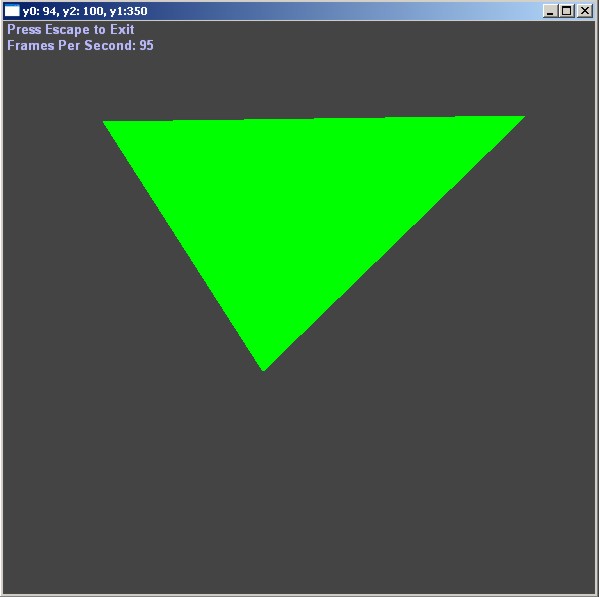
Well I say solid green in the title, but of course you can use any colour you want - and because we are only aiming to draw a solid triangle here - later on, when you add things like lighting and shading to your drawing/3D rasterization engine, the triangle will be multi-coloured....using Gourand shading for example :)


Green triangle rendered using rasterization.


Part-1- of our code demonstrates the principle of how you would go about rendering a general triangle. Remember what I said 'General' Triangle. As you will most likely split up your rendering process into 3 parts eventually, so you can get the most speed. The 3 types of triangle, are a triangle with a flat bottom....and triangle with a flat top...and of course a general triangle...which can be any type of triangle.


I think the code is pretty simple to follow, but I will take the time to explain it in a bit - but be sure you understand how it works - as we will be modifying it to a fixed point 16-16 format later on so we can sqeeezzeee the most amount of speed from this simple triangle drawing algorithm.

DownloadSourceCode

Source Code


Below shows the key lines for the implementation example.


setpixel(unsigned int* pBits, int w, int h, int pitch, int x, int y, DWORD dwColour) { pBits[x + y*(pitch>>2)]=dwColour; }// end of setpixel void cls(unsigned int* pBits, int w, int h, int pitch) { for(int y=0; y<h; y++) { for(int x=0; x<w; x++) { pBits[x + y*(pitch>>2)] = 0xff444444; } } }// end of cls(..) void SWAP(int& a, int& b) { int temp = a; a = b; b = temp; } void SWAP(float& a, float& b) { float temp = a; a = b; b = temp; } void Draw_Solid_Triangle(unsigned int* pBits, int w, int h, int pitch, int x0, int y0, int x1, int y1, int x2, int y2, DWORD dwColour) { // Sort our points into order of y // 0 top // 2 middle // 1 bottom if( y1 < y0 ) { SWAP(y1, y0); SWAP(x1, x0); } if( y2 < y0 ) { SWAP(y2, y0); SWAP(x2, x0); } if( y1 < y2 ) { SWAP(y2, y1); SWAP(x2, x1); } float xl_edge = (float)x0; // left edge float xr_edge = (float)x0; // right edge float dxldy; float dxrdy; float dxdy1 = (float)(x2-x0)/(y2-y0); float dxdy2 = (float)(x1-x0)/(y1-y0); if( dxdy1 < dxdy2 ) { dxldy = dxdy1; dxrdy = dxdy2; } else { dxldy = dxdy2; dxrdy = dxdy1; } // Top of the triangle for(int y=y0; y<y2; y++) { for(int x=xl_edge; x<xr_edge; x++) { setpixel(pBits, w, h, pitch, x, y, dwColour); }//end for loop x xl_edge = xl_edge + dxldy; xr_edge = xr_edge + dxrdy; }// end for loop y // Bottom half of the triangle if( dxdy1 < dxdy2 ) { dxldy = (float)(x2-x1)/(y2-y1); } else { dxrdy = (float)(x2-x1)/(y2-y1); } for(int y=y2; y<y1; y++) { for(int x=xl_edge; x<xr_edge; x++) { setpixel(pBits, w, h, pitch, x, y, dwColour); }//end for loop x xl_edge = xl_edge + dxldy; xr_edge = xr_edge + dxrdy; }// end for loop y extern HWND hWnd; char buf[200]; sprintf(buf, "y0: %d, y2: %d, y1:%d", y0, y2, y1); SetWindowText(hWnd, buf); } void Render(unsigned int* pBits, int w, int h, int pitch) { // Clear our screen to black cls(pBits, w, h, pitch); int x0=100, y0=100; static int x1=90; static int y1=100; int x2=260, y2=350; extern HWND hWnd; POINT mousePos; GetCursorPos(&mousePos); ScreenToClient(hWnd, &mousePos); if( (mousePos.y < h) && (mousePos.x>0) && (mousePos.x<w) && (mousePos.y>0) ) { char buf[200]; sprintf(buf, "x: %d, y: %d", mousePos.x, mousePos.y); //SetWindowText(hWnd, buf); x1 = mousePos.x; y1 = mousePos.y; } Draw_Solid_Triangle(pBits, w, h, pitch, x0, y0, x1, y1, x2, y2, 0xff00ff00); }// end of Render(..)


Advert (Support Website)

 
 Visitor:
Copyright (c) 2002-2026 xbdev.net - All rights reserved.
Designated articles, tutorials and software are the property of their respective owners.