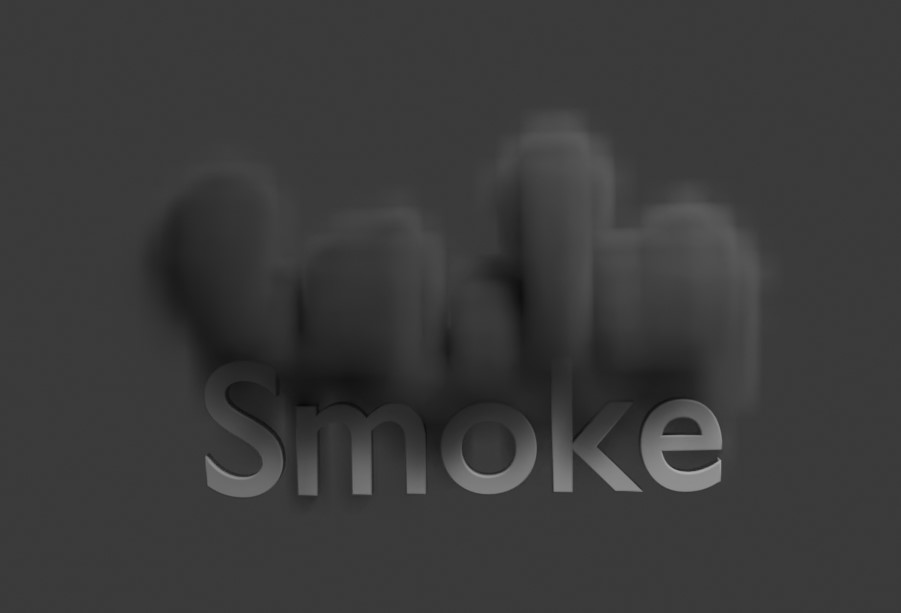
A nice use of the smoke (gas) effect - we'll create some simple 3d text - then have it gradually turn into a smoke and float upwards.
You can see a quick render - I've left the 3d mesh text on - and it shows the smoke after 40 frames - as it's started to float up away from the text. Also the resolution is only 32 - crank it up to 128 to see more swirls and vortex smoke type effects.
<?php
import bpy
import math

# Delete all existing objects
bpy.ops.object.select_all(action='SELECT')
bpy.ops.object.delete(use_global=False)

for obj in bpy.data.objects:
    bpy.data.objects.remove(obj, do_unlink=True)

# Add 3D text
bpy.ops.object.text_add(location=(0, 0, 1))
text_obj = bpy.context.object
text_obj.data.body = "Smoke"
text_obj.name = "SmokeText"

# Extrude text to give it depth
text_obj.data.size = 2.0
text_obj.data.extrude = 0.2
text_obj.data.bevel_depth = 0.02
text_obj.data.align_x = 'CENTER'
text_obj.data.align_y = 'CENTER'

# Rotate to face upwards (from default XY plane to Z-up)
text_obj.rotation_euler = (math.radians(90), 0, 0)

# Convert to mesh
bpy.context.view_layer.objects.active = text_obj
bpy.ops.object.convert(target='MESH')

# Add smoke domain
bpy.ops.mesh.primitive_cube_add(size=8, location=(0, 0, 4))
domain = bpy.context.object
domain.name = "SmokeDomain"
bpy.ops.object.modifier_add(type='FLUID')
domain.modifiers["Fluid"].fluid_type = 'DOMAIN'
domain.modifiers["Fluid"].domain_settings.domain_type = 'GAS'
domain.modifiers["Fluid"].domain_settings.resolution_max = 32
#domain.modifiers["Fluid"].domain_settings.use_dissolve_smoke = True

# Set the text object as smoke flow
bpy.context.view_layer.objects.active = text_obj
bpy.ops.object.modifier_add(type='FLUID')
text_obj.modifiers["Fluid"].fluid_type = 'FLOW'
text_obj.modifiers["Fluid"].flow_settings.flow_type = 'SMOKE'
text_obj.modifiers["Fluid"].flow_settings.flow_behavior = 'GEOMETRY'
text_obj.modifiers["Fluid"].flow_settings.flow_source = 'MESH'
text_obj.modifiers["Fluid"].flow_settings.surface_distance = 0.5

# Principle volume material - so we can see it in the render
# Create a new material for the smoke domain
smoke_mat = bpy.data.materials.new(name="SmokeMaterial")
smoke_mat.use_nodes = True

# Get the material's node tree
nodes = smoke_mat.node_tree.nodes
links = smoke_mat.node_tree.links

# Clear default nodes
nodes.clear()

# Add Principled Volume node
volume_node = nodes.new(type='ShaderNodeVolumePrincipled')
volume_node.location = (0, 0)
volume_node.inputs["Density"].default_value = 40.0  # Adjust for visible density

# Add Material Output node
output_node = nodes.new(type='ShaderNodeOutputMaterial')
output_node.location = (200, 0)

# Connect the volume shader to the output
links.new(volume_node.outputs["Volume"], output_node.inputs["Volume"])

# Assign material to the domain
domain.data.materials.append(smoke_mat)

# We can only see the mesh in the first couple of frames
# Frame 1: Make text visible
bpy.context.scene.frame_set(1)
text_obj.hide_render = False
text_obj.hide_viewport = False
text_obj.keyframe_insert(data_path="hide_render")
text_obj.keyframe_insert(data_path="hide_viewport")

# Frame 3: Hide the text object
bpy.context.scene.frame_set(3)
text_obj.hide_render = True
text_obj.hide_viewport = True
text_obj.keyframe_insert(data_path="hide_render")
text_obj.keyframe_insert(data_path="hide_viewport")


# Add camera
bpy.ops.object.camera_add(location=(8, -8, 6), rotation=(1.2, 0, 0.8))
bpy.context.scene.camera = bpy.context.object

# Add light
bpy.ops.object.light_add(type='AREA', location=(5, -5, 10))
bpy.context.object.data.energy = 1000

# Set timeline
bpy.context.scene.frame_end = 120
Tweaks
Moving the camera, adding in some materials - also for the final render, I'd recommend you ramp up the resolution to 128 and do a 'bake' - so it doesn't take forever to preview - and you get to see a final high quality smoke effect that's really cool looking!
See tile of the frames for the output.
<?php
import bpy
import math

# Delete all existing objects
bpy.ops.object.select_all(action='SELECT')
bpy.ops.object.delete(use_global=False)

for obj in bpy.data.objects:
    bpy.data.objects.remove(obj, do_unlink=True)

# Add 3D text
bpy.ops.object.text_add(location=(0, 0, 1))
text_obj = bpy.context.object
text_obj.data.body = "Smoke"
text_obj.name = "SmokeText"

# Extrude text to give it depth
text_obj.data.size = 2.0
text_obj.data.extrude = 0.2
text_obj.data.bevel_depth = 0.02
text_obj.data.align_x = 'CENTER'
text_obj.data.align_y = 'CENTER'

# Rotate to face upwards (from default XY plane to Z-up)
text_obj.rotation_euler = (math.radians(90), 0, 0)

# Convert to mesh
bpy.context.view_layer.objects.active = text_obj
bpy.ops.object.convert(target='MESH')

# Add smoke domain
bpy.ops.mesh.primitive_cube_add(size=8, location=(0, 0, 4))
domain = bpy.context.object
domain.name = "SmokeDomain"
bpy.ops.object.modifier_add(type='FLUID')
domain.modifiers["Fluid"].fluid_type = 'DOMAIN'
domain.modifiers["Fluid"].domain_settings.domain_type = 'GAS'
domain.modifiers["Fluid"].domain_settings.resolution_max = 32
domain.modifiers["Fluid"].domain_settings.use_dissolve_smoke = True
domain.modifiers["Fluid"].domain_settings.dissolve_speed = 25
domain.modifiers["Fluid"].domain_settings.vorticity = 0.2
domain.modifiers["Fluid"].domain_settings.cache_frame_end = 60
domain.modifiers["Fluid"].domain_settings.beta = 5


# Set the text object as smoke flow
bpy.context.view_layer.objects.active = text_obj
bpy.ops.object.modifier_add(type='FLUID')
text_obj.modifiers["Fluid"].fluid_type = 'FLOW'
text_obj.modifiers["Fluid"].flow_settings.flow_type = 'SMOKE'
text_obj.modifiers["Fluid"].flow_settings.flow_behavior = 'GEOMETRY'
text_obj.modifiers["Fluid"].flow_settings.flow_source = 'MESH'
text_obj.modifiers["Fluid"].flow_settings.surface_distance = 0
text_obj.modifiers["Fluid"].flow_settings.volume_density = 1


# Principle volume material - so we can see it in the render
# Create a new material for the smoke domain
smoke_mat = bpy.data.materials.new(name="SmokeMaterial")
smoke_mat.use_nodes = True

# Get the material's node tree
nodes = smoke_mat.node_tree.nodes
links = smoke_mat.node_tree.links

# Clear default nodes
nodes.clear()

# Add Principled Volume node
volume_node = nodes.new(type='ShaderNodeVolumePrincipled')
volume_node.location = (0, 0)
volume_node.inputs["Density"].default_value = 40.0  # Adjust for visible density
volume_node.inputs["Color"].default_value = (0.2, 0.4, 1.0, 1.0)  # RGBA: A soft blue tone

# Add Material Output node
output_node = nodes.new(type='ShaderNodeOutputMaterial')
output_node.location = (200, 0)

# Connect the volume shader to the output
links.new(volume_node.outputs["Volume"], output_node.inputs["Volume"])

# Assign material to the domain
domain.data.materials.append(smoke_mat)

# We can only see the mesh in the first couple of frames
# Frame 1: Make text visible
if True:
    bpy.context.scene.frame_set(1)
    text_obj.hide_render = False
    text_obj.keyframe_insert(data_path="hide_render")
    #text_obj.hide_viewport = False
    #text_obj.keyframe_insert(data_path="hide_viewport")


    # Frame x: Hide the text object
    bpy.context.scene.frame_set(4)
    text_obj.hide_render = True
    text_obj.keyframe_insert(data_path="hide_render")
    #text_obj.hide_viewport = True
    #text_obj.keyframe_insert(data_path="hide_viewport")

    # Access the smoke material's Principled Volume node
    # Frame 1: Set density to 0 (invisible)
    bpy.context.scene.frame_set(1)
    volume_node.inputs["Density"].default_value = 0.0
    volume_node.inputs["Density"].keyframe_insert("default_value")

    bpy.context.scene.frame_set(3)
    volume_node.inputs["Density"].default_value = 0.0
    volume_node.inputs["Density"].keyframe_insert("default_value")

    # Frame 3: Set density to desired value (e.g., 40.0)
    bpy.context.scene.frame_set(4)
    volume_node.inputs["Density"].default_value = 40.0
    volume_node.inputs["Density"].keyframe_insert("default_value")


# Create new blue material for the text
blue_mat = bpy.data.materials.new(name="BlueTextMaterial")
blue_mat.use_nodes = True

# Access the Principled BSDF node
nodes = blue_mat.node_tree.nodes
bsdf_node = nodes.get("Principled BSDF")
if bsdf_node:
    bsdf_node.inputs["Base Color"].default_value = (0.2, 0.4, 1.0, 1.0)  # Same RGBA as smoke

# Assign the material to the text object
if text_obj.data.materials:
    text_obj.data.materials[0] = blue_mat
else:
    text_obj.data.materials.append(blue_mat)


# Add camera
import math
# Add camera directly in front of the text
bpy.ops.object.camera_add(location=(0, -10, 1.5), rotation=(math.radians(90), 0, 0))
cam = bpy.context.object
bpy.context.scene.camera = cam

# Add light
bpy.ops.object.light_add(type='AREA', location=(5, -5, 10))
bpy.context.object.data.energy = 1000

# Set background color to white
bpy.context.scene.world.use_nodes = True
bg_nodes = bpy.context.scene.world.node_tree.nodes
bg_nodes["Background"].inputs[0].default_value = (1, 1, 1, 1)  # RGBA: White


# Set timeline
bpy.context.scene.frame_end = 60
The generated animation as a gif.
Visitor:
Copyright (c) 2002-2026 xbdev.net - All rights reserved.
Designated articles, tutorials and software are the property of their respective owners.