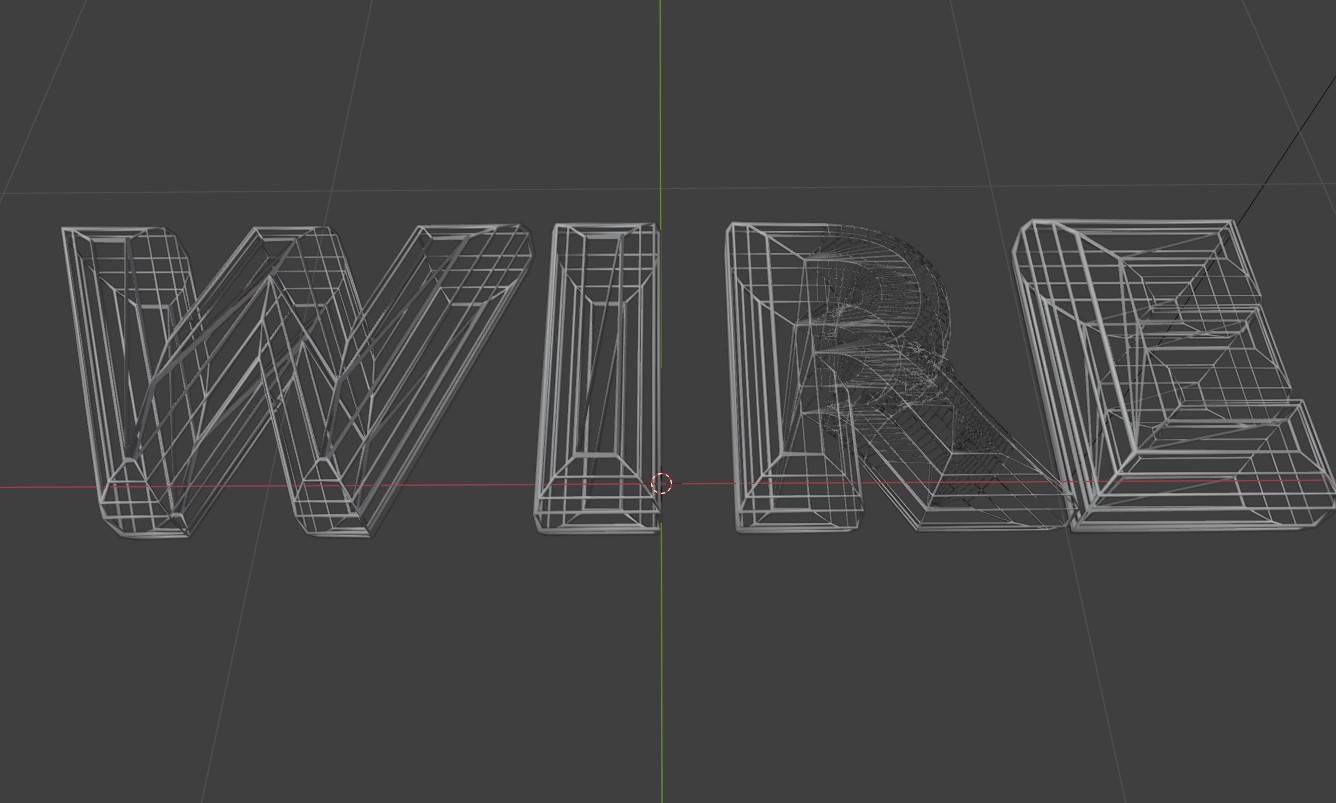
We convert the text to a mesh (same as before) - but we take advantage of the wireframe modifier - to convert the mesh into wire tubes - so when we render the scene - our mesh is now a wireframe look (scaffolding).
Take the solid mesh and view it as a 'wireframe' - however, it's not the mesh triangles - but a modifier to view the shape as wire. We can control the thickness and number of lines - it can also be viewed and displayed in the output renderer.
<?php
import bpy
from mathutils import Vector

# Clear existing objects
bpy.ops.object.select_all(action='SELECT')
bpy.ops.object.delete()

# Create text object
bpy.ops.object.text_add(align='WORLD', location=(0, 0, 0))
text_obj = bpy.context.object
text_obj.name = "WIRE_Text"
text_obj.data.body = "WIRE"
text_obj.data.align_x = 'CENTER'
text_obj.data.extrude = 0.05
text_obj.data.bevel_depth = 0.1
text_obj.data.bevel_resolution = 2  # Higher for smoother bevels
text_obj.data.space_character = 1.5  # Letter spacing

# Convert text to mesh
bpy.ops.object.convert(target='MESH')

# Add subdivision modifier for smoothness
#subd_mod = text_obj.modifiers.new(name="Subdivision", type='SUBSURF')
#subd_mod.levels = 2
#subd_mod.render_levels = 3

# Apply subdivision (optional - comment out to keep modifier)
# bpy.ops.object.modifier_apply(modifier="Subdivision")

# Add wireframe modifier
wire_mod = text_obj.modifiers.new(name="Wireframe", type='WIREFRAME')
wire_mod.thickness = 0.05
wire_mod.use_boundary = True
wire_mod.use_even_offset = False
wire_mod.use_relative_offset = True
wire_mod.offset = 0.5

# Create material for wireframe
mat = bpy.data.materials.new(name="WireMaterial")
mat.use_nodes = True
nodes = mat.node_tree.nodes
links = mat.node_tree.links
nodes.clear()

# Create simple metallic material
bsdf = nodes.new('ShaderNodeBsdfPrincipled')
bsdf.inputs['Base Color'].default_value = (0.9, 0.9, 0.9, 1)
bsdf.inputs['Metallic'].default_value = 1.0
bsdf.inputs['Roughness'].default_value = 0.2

output = nodes.new('ShaderNodeOutputMaterial')
links.new(bsdf.outputs['BSDF'], output.inputs['Surface'])

# Assign material
if text_obj.data.materials:
    text_obj.data.materials[0] = mat
else:
    text_obj.data.materials.append(mat)

# Set up lighting
bpy.ops.object.light_add(type='SUN', location=(5, 5, 10))
sun = bpy.context.object
sun.data.energy = 3.0
sun.data.angle = 0.2

bpy.ops.object.light_add(type='AREA', location=(0, -5, 5))
area = bpy.context.object
area.data.energy = 300
area.data.size = 2.0

# Set up camera
bpy.ops.object.camera_add(location=(3, -5, 3))
camera = bpy.context.object
camera.rotation_euler = (1.1, 0, 0.5)
bpy.context.scene.camera = camera

# Set render settings
bpy.context.scene.render.engine = 'CYCLES'
bpy.context.scene.cycles.samples = 128

# Add background
world = bpy.context.scene.world
world.use_nodes = True
world_nodes = world.node_tree.nodes
world_links = world.node_tree.links
world_nodes.clear()

bg = world_nodes.new('ShaderNodeBackground')
bg.inputs['Color'].default_value = (0.05, 0.05, 0.1, 1)
bg.inputs['Strength'].default_value = 0.5

world_output = world_nodes.new('ShaderNodeOutputWorld')
world_links.new(bg.outputs['Background'], world_output.inputs['Surface'])
Visitor:
Copyright (c) 2002-2026 xbdev.net - All rights reserved.
Designated articles, tutorials and software are the property of their respective owners.