Fractals make you see everything differently. When you first read and learn about fractals, it's like Pandora's box. A hidden magic of unlimited possibilities. Not only are fractals incredibly powerful, but they are also beautiful and fun. In particular, graphical fractals possess infinite detail combined with unpredictability, that is really amazing. Once you get past all of the mathematics and visualization challenges, you'll never look at the world the same again ;)
A particular fractal with interesting visual properties is the Mandelbulb.
Famous 2D Mandelbrot Equation
2D Mandelbrot equation:
\[
z_{n+1} = z_{n}^2+c
\]
Squaring complex numbers has a simple geometric interpretation: if the complex number is represented in polar coordinates, squaring the number corresponds to squaring the length, and doubling the angle (to the real axis).
Taking the Mandelbrot equation to higher dimensions leads us to what is now known as the Mandelbulb fractal.
2D Cross-section Of (3D) Mandelbrot Fractal
<?php
import math
import random
from PIL import Image
imgx = 256 # 512
imgy = 256 # 512
image = Image.new("RGB", (imgx, imgy))
pixels = image.load()
n = 8
# drawing area (xa < xb & ya < yb)
xa = -1.5
xb = 1.5
ya = -1.5
yb = 1.5
maxIt = 256 # 256 # max number of iterations allowed
pi2 = math.pi * 2.0
# random rotation angles to convert 2d plane to 3d plane
xy = 0.2 * pi2; # random.random() * pi2
xz = 0.2 * pi2; # random.random() * pi2
yz = 0.2 * pi2; # random.random() * pi2
sxy = math.sin(xy) ; cxy = math.cos(xy)
sxz = math.sin(xz) ; cxz = math.cos(xz)
syz = math.sin(yz) ; cyz = math.cos(yz)

origx = (xa + xb) / 2.0 ; origy = (ya + yb) / 2.0
for ky in range(imgy):
    b = ky * (yb - ya) / (imgy - 1)  + ya
    for kx in range(imgx):
        a = kx * (xb - xa) / (imgx - 1)  + xa
        x = a ; y = b ; z = 0.5
        # 3d rotation around center of the plane
        x = x - origx ; y = y - origy
        x0=x*cxy-y*sxy;y=x*sxy+y*cxy;x=x0 # xy-plane rotation
        x0=x*cxz-z*sxz;z=x*sxz+z*cxz;x=x0 # xz-plane rotation
        y0=y*cyz-z*syz;z=y*syz+z*cyz;y=y0 # yz-plane rotation
        x = x + origx ; y = y + origy

        cx = x ; cy = y ; cz = z
        for i in range(maxIt):
            r = math.sqrt(x * x + y * y + z * z)
            t = math.atan2(math.hypot(x, y), z)
            p = math.atan2(y, x)
            rn = r ** n
            x = rn * math.sin(t * n) * math.cos(p * n) + cx
            y = rn * math.sin(t * n) * math.sin(p * n) + cy
            z = rn * math.cos(t * n) + cz
            if x * x + y * y + z * z > 150.0:
               break

            if i > 1 and i <= 50:
                ss = 128 + int( 128.0 * (i/50.0) )
                pixels[kx, ky] = (ss, 0, 0)
            if i > 50 and i <= 100:
                ss = 128 + int( 128.0 * ((i-100)/50.0) )
                pixels[kx, ky] = (0, ss, 0)
            if i > 100 and i <= 150:
                ss = 128 + int( 128.0 * ((i-100)/100.0) )
                pixels[kx, ky] = (0, 0, ss)
            if i == 2:
                pixels[kx, ky] = (255, 255, 255 )


image.save("Mandelbulb.png", "PNG")
Output for the above Python program. Show the cross sectional view of a Mandelbulb.
Slice of Mandelbulb (Cross Sectional View).
The various depths are shown in different colours.
MandelBulb Ray Tracer (Stripped)
A minimum working Mandelbulb ray tracing implementation.
All you need is a C++ compiler. Of course, you could port it to Python, as it's relatively straightforward, but it would be slow! It's slow in C++, it takes a few seconds to create the image in C++, so it might take a few minutes in Python.
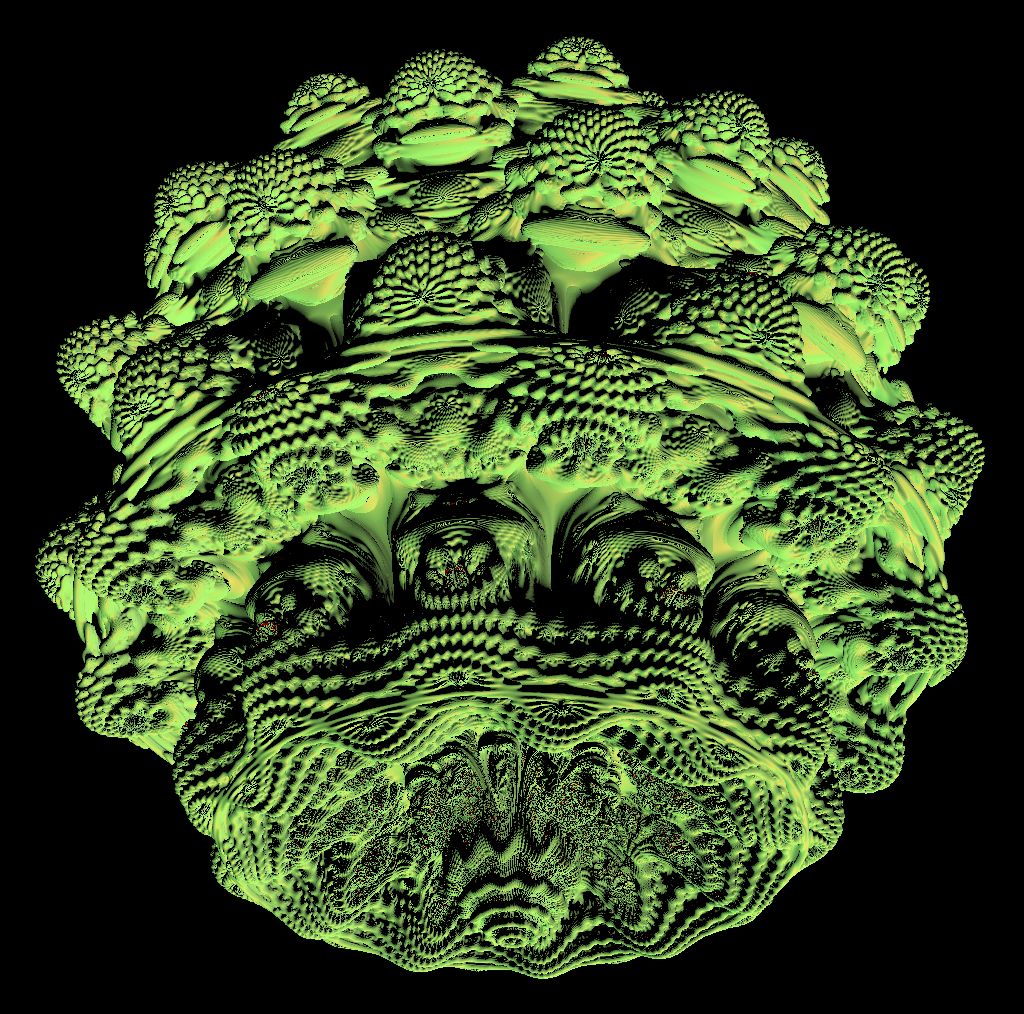
The implementation should hopefully let you see how it all fits together. Also a fun demo for you to tinker with and experiment with as you learn about geometric fractals.
The following implementation creates a ppm image file. You should be able to open this image file in most image editors (e.g., XNView is a free image viewer/formatter if you don't have Photoshop).
Mandelbulb Visualization (3D Render)
/*
Minimal working (Mandelbulb xbdev.net)

PPM image format is a simple and uncomplicated way to generate an image without
requiring any external libraries.  Easy to open and convert to another format
(e.g., open and save as jpg using paint/xnview).
*/

#define _CRT_SECURE_NO_WARNINGS


// constants to tweak and control the fractal output
#define BAILOUT        100
#define EPS            0.001
#define mmaxIterations 10


#define maxDetailIter  100
// e.g., try and change this value to 5 instead
// and see what the generated output looks like
#define myPower        12


#include <math.h>
#include <iostream>
#include <stdlib.h>
#include <stdio.h>

using namespace std;


#define M_PI 3.14159265358979323846264338327950288

inline double clamp(double x) { return x < 0 ? 0 : x>1 ? 1 : x; }
inline double min(double x, double y){ if (x<y) return x; return y; }
inline double max(double x, double y){ if (x>y) return x; return y; }
inline int toInt(double x) { return int(pow(clamp(x), 1 / 2.2) * 255 + .5); }
inline double clamp(const double ff, double lo, double hi)
{
    if (ff > hi) return hi;
    if (ff < lo) return lo;
    return ff;
}

struct vec3 {
    double x, y, z;                  // position, also color (r,g,b)
    vec3(double x_ = 0, double y_ = 0, double z_ = 0) { x = x_; y = y_; z = z_; }
    vec3 operator+(const vec3 &b) const { return vec3(x + b.x, y + b.y, z + b.z); }
    vec3 operator-(const vec3 &b) const { return vec3(x - b.x, y - b.y, z - b.z); }
    vec3 operator*(double b) const { return vec3(x*b, y*b, z*b); }
    vec3 mult(const vec3 &b) const { return vec3(x*b.x, y*b.y, z*b.z); }
    vec3& norm() { return *this = *this * (1 / sqrt(x*x + y*y + z*z)); }
    double dot( const vec3 &b) const { return x*b.x + y*b.y + z*b.z; }
    vec3 cross (vec3&b) { return vec3(y*b.z - z*b.y, z*b.x - x*b.z, x*b.y - y*b.x); }
};

struct vec4 {
    double x, y, z, w;
    vec4(const vec3& v, double _w){ x=v.x, y=v.y, z=v.z, w=_w; }
    vec4(double x_ = 0, double y_ = 0, double z_ = 0, double w_ = 0) { x = x_; y = y_; z = z_; w = w_; }
    vec4 operator+(const vec4 &b) const { return vec4(x + b.x, y + b.y, z + b.z, w + b.w); }
    vec4 operator-(const vec4 &b) const { return vec4(x - b.x, y - b.y, z - b.z, w - b.w); }
    vec4 operator*(double b) const { return vec4(x*b, y*b, z*b, w*b); }
    vec4 mult(const vec4 &b) const { return vec4(x*b.x, y*b.y, z*b.z, w*b.w); }
    vec4& norm() { return *this = *this * (1 / sqrt(x*x + y*y + z*z + w*w)); }
    double dot(const vec4 &b) const { return x*b.x + y*b.y + z*b.z, w*b.w; }

};


double dot(const vec3&a, const vec3 &b) { return a.dot(b); }
double length(const vec3& v) { return sqrt(v.dot(v)); }
double length(const vec4& v) { return sqrt(v.dot(v)); }
vec3 normalize(const vec3& v) {
    double len = length(v);
    return vec3( v.x/len, v.y/len, v.z/len );
}


/*
These two functions, MainBulb(..) and IntersectMBulb(..)
do all of the work.  Responsible for the fractal shape/details
*/

vec4 MainBulb(vec4 v)
{
    double r = length( vec3(v.x, v.y, v.z) );
    if (r>BAILOUT) return v;
    double theta = acos(clamp(v.z / r, -1.0, 1.0))*myPower;
    double phi = atan2(v.y, v.x)*myPower;
    v.w = pow(r, myPower - 1.0)*myPower*v.w + 1.0;

    double zr = pow(r, myPower);

    vec3 vv = vec3(sin(theta)*cos(phi), sin(phi)*sin(theta), cos(theta))*zr;
    return vec4(vv.x, vv.y, vv.z, v.w);
}

double IntersectMBulb(vec3& rO, vec3& rD, vec4& trap)
{
    double dist;
    for (int i = 0; i<maxDetailIter; i++) {
        double r = 0.0;
        vec4 v = vec4(rO.x, rO.y, rO.z, 1.0);

        vec3 va (v.x, v.y, v.z);

        trap = vec4(abs(v.x), abs(v.y), abs(v.z), dot(va, va));

        for (int n = 0; n<mmaxIterations; ++n)
        {
            va = vec3(v.x, v.y, v.z);
            r = length(va);
            if (r>BAILOUT) break;

            v = MainBulb(v) + vec4(rO.x, rO.y, rO.z, 0.0);

            va = vec3(v.x, v.y, v.z);
            vec4 v4 (abs(va.x), abs(va.y), abs(va.z), dot(va, va));
            trap.x = min(trap.x, v4.x);
            trap.y = min(trap.y, v4.y);
            trap.z = min(trap.z, v4.z);
            trap.w = min(trap.w, v4.w);
        }

        dist = 0.5*log(r)*r / v.w;
        rO = rO + rD * dist;
        if (dist < EPS) break;
    }
    return dist;
}


/*
  Hacky code to work out an approximate normal for our
  geometry (without lighting it looks horrible)
*/
vec3 NormEstimateMB(vec3 p) {

    double ddd = 0.000001;

    vec4 g0 = vec4(p, .0);
    vec4 gx = vec4(p + vec3(ddd, 0, 0), .0);
    vec4 gy = vec4(p + vec3(0, ddd, 0), .0);
    vec4 gz = vec4(p + vec3(0, 0, ddd), .0);

    vec4 v0 = g0;
    vec4 vx = gx;
    vec4 vy = gy;
    vec4 vz = gz;

    double ln;
    for (int i = 0; i < 100; i++) {
        g0 = MainBulb(g0) + v0;
        gx = MainBulb(gx) + vx;
        gy = MainBulb(gy) + vy;
        gz = MainBulb(gz) + vz;
        ln = length( vec3(g0.x, g0.y, g0.z) );
        if (ln>BAILOUT) break;
    }

    //float ln    = length( vec3(g0.x, g0.y, g0.z) );
    double gradX = length( vec3(gx.x, gx.y, gx.z) ) - ln;
    double gradY = length( vec3(gy.x, gy.y, gy.z) ) - ln;
    double gradZ = length( vec3(gz.x, gz.y, gz.z) ) - ln;
    //N = normalize(vec3(length(gx-g0), length(gy-g0), length(gz-g0)));
    return normalize(vec3(gradX, gradY, gradZ));
}

/*
  Good old Phong lighting function
*/
vec3 Phong(vec3 light, vec3 eye, vec3 pt, vec3 N)
{
    vec3 diffuse = vec3(0.40, 0.95, 0.25); // base color of shading
    const int specularExponent = 10;       // shininess of shading
    const double specularity = 0.45;       // amplitude of specular highlight

    vec3 L = normalize(light - pt);        // find the vector to the light
    vec3 E = normalize(eye - pt);          // find the vector to the eye
    double  NdotL = dot(N, L);             // find the cosine of the angle between light and normal
    vec3 R = L - N * 2 * NdotL;            // find the reflected vector

    diffuse = diffuse + N*0.1;             // add some of the normal for 'effect'

    return diffuse * max(NdotL, 0.0) + specularity*pow(max(dot(E, R), 0), specularExponent);
}


/*
  Program entry point - loop over all the image pixels
  and work out the color (i.e., based on a ray we shoot
  at the Mandelbulb fractal/intersection).
*/
int main(int argc, char *argv[]) {

    int w = 1024, h = 1014; // # default resolution
    if ( argc == 2 ) w = h = atoi(argv[1]); // # resolution

    vec3 *c = new vec3[w*h]; // output colors

#pragma omp parallel for schedule(dynamic, 1) private(r)       // OpenMP
    for (int y=0; y < h; y++ ) {       // Loop over image rows
        fprintf(stderr, "\rRendering (%dx%d res) %5.2f%%", w, h, 100.*y / (h - 1));
        for (unsigned short x=0; x < w; x++ )   // Loop cols
        {
            // index for this pixel into color array c
            const int i = (h - y - 1)*w + x;
            // we 'orientate' the ray so it's not just facing
            // down the z-axis. Instead of implementing all the rotation
            // code, we use some simple vector trigonometry to work out
            // the look at point, direction and origin of the ray
            vec3 off(0,-2,-2);
            vec3 dir = vec3(0,0,0) - off;
            dir = normalize(dir);

            off = dir*-2.5;

            vec3 left = vec3(0,1,0).cross( dir );
            left = normalize(left);

            vec3 up = left.cross( dir );
            up = normalize(up);

            // pixels for the screen -0.5 to 0.5
            double dx = -0.5 + ((x / double(w - 1)) * 1.0);
            double dy = -0.5 + ((y / double(h - 1)) * 1.0);

            vec3 rO = off;
            vec3 rD = dir + left*dx + up*dy;
            rD = rD.norm();

            #if 0 // debug - if we want the camera to look down the z axis
            dx = -0.5 + ((x / double(w - 1) ) * 1.0 );
            dy = -0.5 + ((y / double(h - 1)) * 1.0 );
            rD = vec3(dx, dy, 0.9).norm();
            rO = vec3(0,0,-2.3);
            #endif

            vec4 cols(0,0,0,0);
            // distance from the ray to the geometry
            double dist = IntersectMBulb(rO, rD, cols);

            c[i] = vec3(); // default black
            if ( dist < 0.001 )
            {
                // if we get here, then we have 'hit' the geometry, so we can work
                // out some lighting information.
                // If we just set the color to some 'constant' we won't see any of
                // that sexy detail/geometry that is fractals possess
                vec3 light (2,2,-5); // light position

                vec3 N = NormEstimateMB(rO);

                // Compute the Phong illumination at the point of intersection.
                vec3 color = Phong(light, rD, rO, N);
                c[i] = color;
            }
        }
    }

    // details on the ppm image format
    // ref: https://en.wikipedia.org/wiki/Netpbm#PPM_example

    FILE *f = fopen("image.ppm", "w");         // Write image to PPM file.
    fprintf(f, "P3\n%d %d\n%d\n", w, h, 255);
    for (int i = 0; i < w*h; i++)
        fprintf(f, "%d %d %d ", toInt(c[i].x), toInt(c[i].y), toInt(c[i].z));
}
References and Resources
[1] Fractals - Popular fractals, details and implementation examples