The beauty and magic of generating noise field patterns lie in their ability to create intricate, organic visuals that evoke natural textures, landscapes, and even dreamlike worlds from pure mathematical randomness. Noise fields, like Perlin or simplex noise, introduce a controlled randomness that is both unpredictable and coherent, producing flowing gradients and patterns reminiscent of windblown sand dunes, cloud formations, or rippling water. As the algorithm weaves order into chaos, each pattern emerges with a sense of depth and continuity, giving rise to a stunning visual harmony that feels alive and infinitely varied.
The subtle unpredictability of these patterns captures a quality of nature itself—an aesthetic that is rich in complexity, yet serene in form. Whether applied in visual effects, procedural textures, or interactive art, noise fields open doors to endless creative exploration, celebrating both the power and elegance of algorithmic beauty.
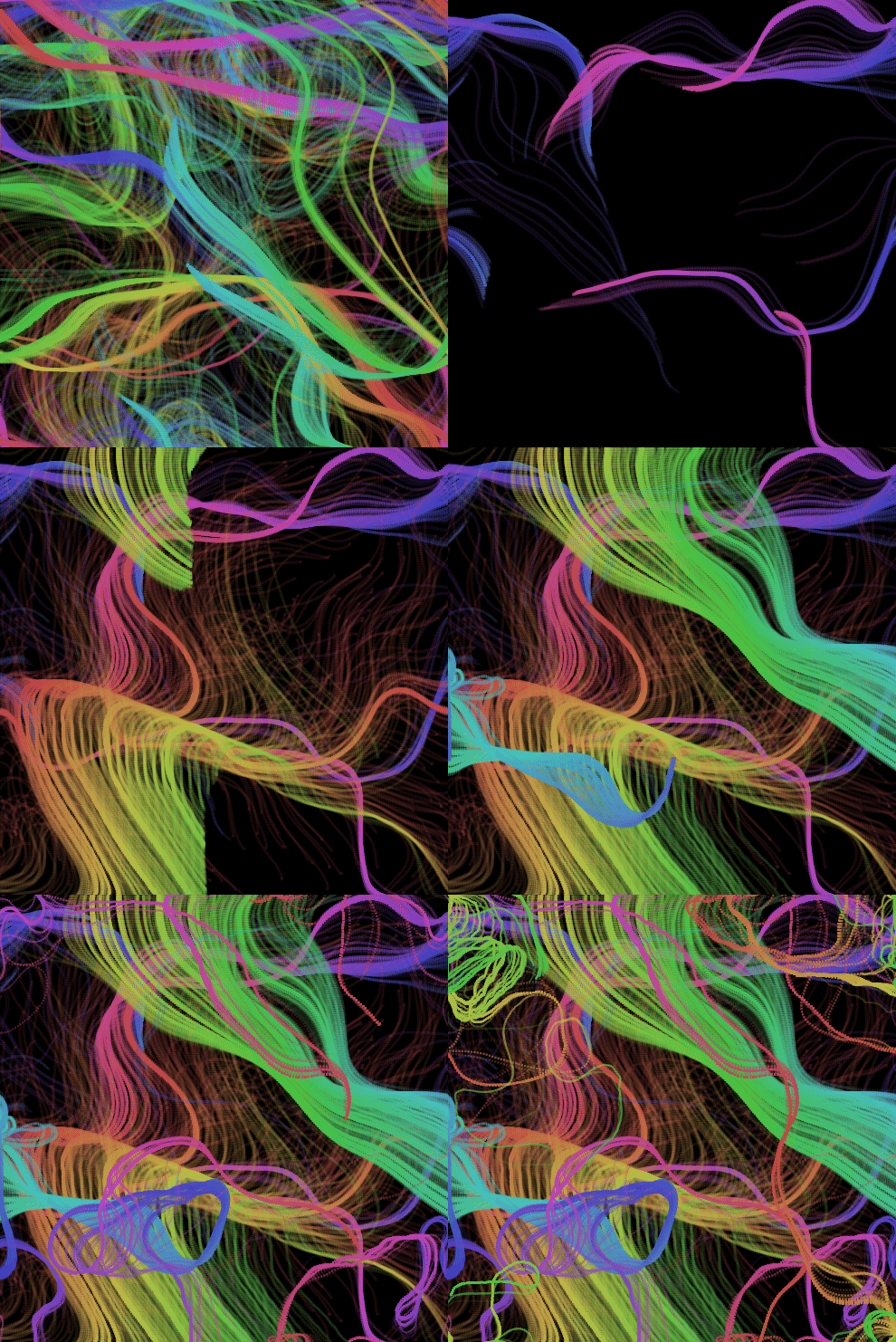
Noise field output generated using the simple demo code below.
Noise Field Code
The complete code for the noise field is given below for review. You can play around with the interactive demo and versions of the noise field in the xbdev notepad page (link at the bottom).
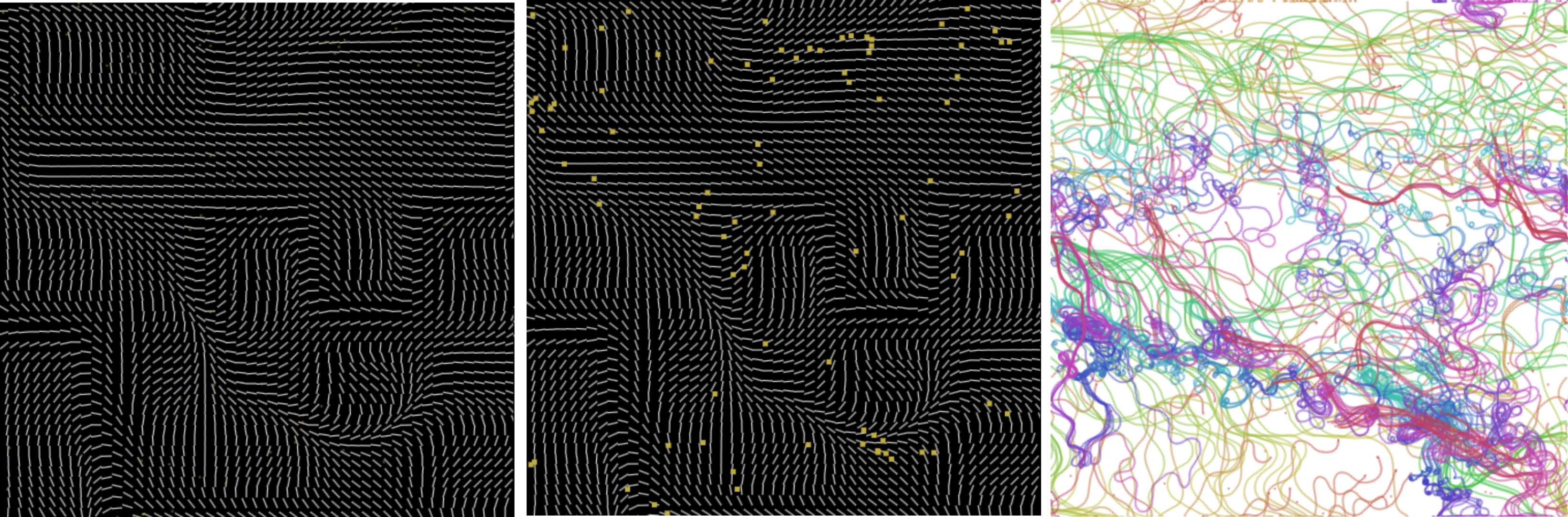
Noise field showing the 'field', 'partices' and 'particles without clear - leaves trail'.
You can create smooth noise using Perlin noise algorithm - this can be animated using a single timer - so the noise scrolls. You can do 1d, 2d, and 3d noise.
We add some random particles onto the screen - and use the noise as the 'direction' the particle should move. As the noise changes and the particles move around - you get a nice pattern.
Particles move in a pattern as if pushed around by an organic force, swirling and flowing.
You can adjust lots of things - the noise frequency, the number of particles, etc to create all sorts of different noise field patterns.
<?php
document.body.style.minHeight = '600';
let canvas = document.createElement('canvas');
document.body.appendChild( canvas );
canvas.width = canvas.height = 500;
canvas.id = 'canvas';

// Helper function for fract (fractional part)
function myfract(x) {
    return x - Math.floor(x);
}

// Helper function indot product
function dot(v1, v2) {
    return v1.x * v2.x + v1.y * v2.y;
}

// Random function
function random(uv) {
    return myfract(Math.sin(dot(uv, { x: 12.9898, y: 78.233 })) * 43758.5453);
}

// Smooth random function
function randomsmooth(st) {
    let freq = 2.0;
    // Integer grid coordinates
    let i = { x: Math.floor(st.x * freq), y: Math.floor(st.y * freq) };
    // Fractional coordinates within the grid cell
    let f = { x: myfract(st.x * freq), y: myfract(st.y * freq) };

    // Sample four corners of the cell using the random function
    let a = random(i);
    let b = random({ x: i.x + 1.0, y: i.y });
    let c = random({ x: i.x, y: i.y + 1.0 });
    let d = random({ x: i.x + 1.0, y: i.y + 1.0 });

    // Smooth the interpolation factor `f` for smoother transition between values
    f.x = f.x * f.x * (3.0 - 2.0 * f.x);
    f.y = f.y * f.y * (3.0 - 2.0 * f.y);

    // Bilinear interpolation between corners
    let x1 = a * (1.0 - f.x) + b * f.x;
    let x2 = c * (1.0 - f.x) + d * f.x;
    let y1 = x1 * (1.0 - f.y) + x2 * f.y;

    return y1;
}


const simplex3 = (a, b, c) => {

  // Sample noise values using randomsmooth
    let vx = randomsmooth({ x: a - c*3.2390230,
                            y: b - c*1.3923 });

    let vy = randomsmooth({ x: a + c*2.19339023,
                            y: b + c*0.19009323 });

    let t = Math.sin( c );
    return vx + (vy-vx)*t;
};

function valid(val)
{
  if ( val === undefined )  { throw 'invalid value'; }
  if ( isNaN( val )      )  { throw 'NaN value'; }
  if ( val < -9999999)      { throw 'number warning range'; }
  if ( val >  9999999)      { throw 'number warning range'; }
}

// Constructor for vec2
function vec2(x, y) {
    this.x = x;
    this.y = y;
    valid(this.x);
    valid(this.y);
    return this;
}

vec2.prototype.float32 = function() {
    let r = new Float32Array(2);
    r[0] = this.x;
    r[1] = this.y;
    return r;
};

// vec2 operations
vec2.add = function(v0, v1) { return new vec2(v0.x + v1.x, v0.y + v1.y); };
vec2.sub = function(v0, v1) { return new vec2(v0.x - v1.x, v0.y - v1.y); };
vec2.scale = function(v0, s) { return new vec2(v0.x * s, v0.y * s); };
vec2.dot = function(v0, v1) { return (v0.x * v1.x + v0.y * v1.y); };
vec2.dist = function(v0) { return Math.sqrt(v0.x * v0.x + v0.y * v0.y); };
vec2.norm = function(v0) {
    let ln = Math.sqrt(v0.x * v0.x + v0.y * v0.y);
    valid(ln);
    return vec2.scale(v0, 1.0 / ln);
};
vec2.lerp = function(a, b, t) {
    let ti = (1 - t);
    return new vec2(ti * a.x + t * b.x, ti * a.y + t * b.y);
};
vec2.fromAngle = function(angle) {
    return new vec2(Math.cos(angle), Math.sin(angle));
};


class Particle {
  constructor(x, y) {
    this.pos = new vec2(x, y);
    this.vel = new vec2(Math.random()*2-1, Math.random()*2-1);
    this.acc = new vec2(0, 0);
    this.size = 2;
  }

  move(acc) {
    if(acc) {
      this.acc = vec2.add(this.acc, acc);
    }

    this.vel = vec2.add( this.vel, this.acc);

    this.pos = vec2.add( this.pos, vec2.scale(this.vel,1.0) );
    if( vec2.dist(this.vel) > 1.0 ) {
      this.vel = vec2.scale( vec2.norm( this.vel ), 1.0 );
    }
    this.acc = new vec2(0,0);
  }

  draw() {
    let ss = this.size;
    //ss = 12.0;
    ctx.fillRect(this.pos.x, this.pos.y, ss, ss);
  }

  wrap() {
    if(this.pos.x > w) {
      this.pos.x = 0;
    } else if(this.pos.x < 0 ) { //  -this.size) {
      this.pos.x = w - 2;
    }

    if(this.pos.y > h) {
      this.pos.y = 0;
    } else if(this.pos.y < 0 ) { //  -this.size) {
      this.pos.y = h - 2;
    }
  }
}

let ctx;
let field;
let w, h;
let size;
let columns;
let rows;
let noiseZ;
let particles;
let hue;

function setup() {
  size = 10;
  hue = 0;
  noiseZ = 0;
  canvas = document.querySelector("#canvas");
  ctx = canvas.getContext("2d");
  reset();
  window.addEventListener("resize", reset);
}

function initParticles() {
  particles = [];
  let numberOfParticles = w * h / 3000;
  for(let i = 0; i < numberOfParticles; i++) {
    let particle = new Particle(Math.random() * w, Math.random() * h);
    particles.push(particle);
  }
  //console.log('init particles');
}

function initField() {
  //console.log('init field');
  field = new Array(columns);
  for(let x = 0; x < columns; x++) {
    field[x] = new Array(columns);
    for(let y = 0; y < rows; y++) {
      //field[x][y] = {};
      let v = new vec2(0, 0);
      field[x][y] = v;

    }
  }
}

function calculateField() {
  //console.log('calc field');
  for(let x = 0; x < columns; x++) {
    for(let y = 0; y < rows; y++) {
      let angle = simplex3(x/20, y/20, noiseZ) * Math.PI * 2;
      let len = simplex3(x/40 + 40000, y/40 + 40000, noiseZ) * 0.5;
      //field[x][y] = vec2.norm( field[x][y] );
      //field[x][y].angle = angle;
      field[x][y] = vec2.fromAngle( angle );
      field[x][y].len   = len;
      field[x][y].angle = angle;
    }
  }
}

function reset() {
  w = canvas.width;// = window.innerWidth;
  h = canvas.height;// = window.innerHeight;
  ctx.strokeStyle = "white";
  columns = Math.round(w / size) + 1;
  rows = Math.round(h / size) + 1;
  initParticles();
  initField();

  //console.log('reset finished');
}

function draw(now) {
  requestAnimationFrame(draw);
  calculateField();
  noiseZ += 0.01;//= now * 0.0002;
 // drawBackground();
 // drawFlowField();
  drawParticles();
}

function drawBackground() {
  ctx.fillStyle = "black";
  ctx.fillRect(0, 0, w, h);
}

function drawParticles() {
  hue += 0.5;
  ctx.fillStyle = `hsla(${hue}, 50%, 50%, 0.5)`;
  particles.forEach(p => {
    p.draw();

    let pos = vec2.scale( p.pos, 1.0 / size );//.div(size);
    let v= {x:1, y:1};
    if(pos.x >= 0 && pos.x < columns && pos.y >= 0 && pos.y < rows) {
      v = field[Math.floor(pos.x)][Math.floor(pos.y)];
    }

    p.move(v);
    p.wrap();
  });
}

function drawFlowField() {

  for(let x = 0; x < columns; x++) {
    for(let y = 0; y < rows; y++) {
      ctx.beginPath();
      let x1 = x*size;
      let y1 = y*size;
      ctx.moveTo(x1, y1);
      ctx.lineTo(x1 + field[x][y].x*size, y1 + field[x][y].y*size);
      ctx.stroke();
    }
  }


}

setup();
draw(performance.now());
Things to Try
• Use an overlay canvas with a pattern on to control the noise (e.g., large letters/text) so when the particles go over these areas that are 'black' with the text pixels - the noise increases or decreases. So you see a hidden pattern in the noise generated
• Try Other noise patterns - used a simple Perlin smooth noise but ohter noise patterns can produce other results (e.g., fractal brownian noise)
• Particles with different shapes - instead of just a point - they could be short lines or an x-shape - as it moves around and isn't cleared it creates a pen-like style
• Add user interaction - so the user can drag the mouse around on screen to add noise? Or control the noise directoin/pattern.
• Other colors - maybe take the color from a 'texture' instead of a hard coded value?